

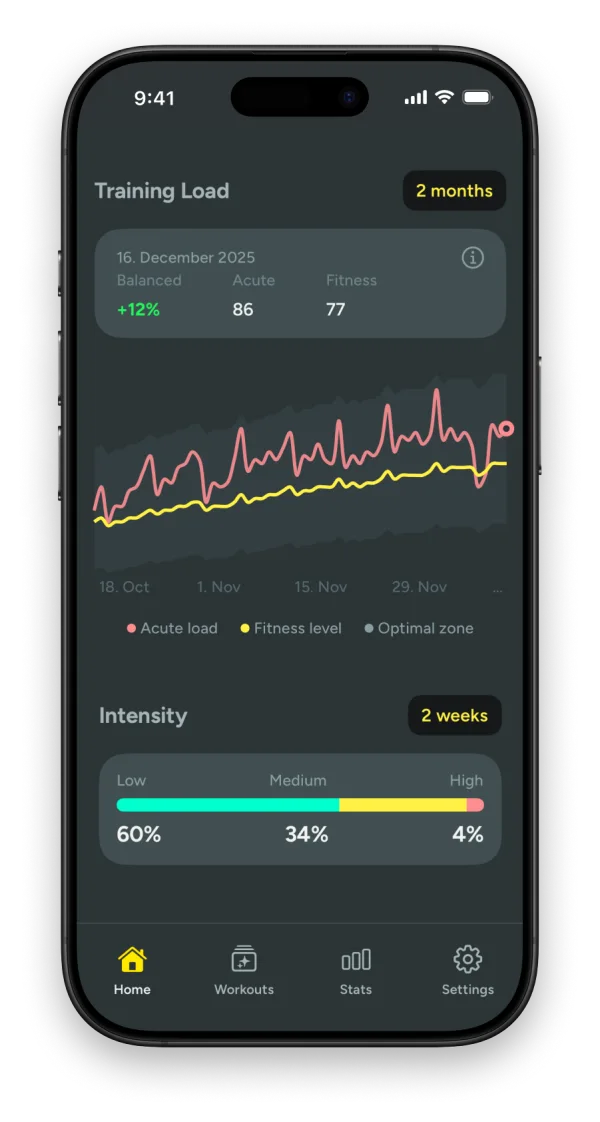
What training load tells you
Training load is the stress your workouts put on your body. One hard session says very little. What matters is how this week compares with what your body is used to. Ramp up too fast and you end up tired, flat or hurt. Do too little for too long and fitness fades.
Kiiro tracks three things:
- Acute load: your recent training effort, mostly from the past week. Heavier workouts weigh more, and older ones fade over time. It tracks short-term fatigue.
- Fitness level: your longer-term training, roughly the past six weeks. It is your training base, and it builds gradually as you stay consistent.
- Load balance: your acute load compared with your fitness level. In the optimal zone you are training smart and recovering well. Too high and you may be overreaching. Too low and you risk detraining.
What you see in Kiiro
Your load balance as a percentage with one status beside it, such as +12% Balanced, updated after every workout, with a plain sentence about what it means for your next few days.
| Status | Load balance | What it means |
|---|---|---|
| Undertrained | below −50% | Far less than you are used to. Fitness is fading. |
| Detraining | −50% to −20% | Noticeably less than usual. Fine for a recovery week, not for a month. |
| Fresh | −20% to −5% | Slightly under your normal. A good place to be before a race or a hard block. |
| Balanced | −5% to +15% | In line with what your body is prepared for. |
| Building | +15% to +30% | More than usual, at a rate you can absorb. This is how fitness grows. |
| Fatigued | +30% to +50% | A big jump. Fine for a few days if recovery follows. |
| Overtrained | above +50% | Much more than you are prepared for. Time to back off. |
Alongside it you get a chart of acute load against fitness level with the optimal zone marked, weekly and monthly trends, your highest fitness, and a clear warning before you overdo it.
How Kiiro calculates it
- Every workout gets a training load from your heart rate: the time you spent at each intensity, weighted so hard minutes count more than easy ones, relative to your own resting and maximum heart rate.
- Acute load is a weighted average over 7 days and fitness level over 42 days. Newer workouts count more than older ones, so the numbers move smoothly instead of jumping when a workout drops out of the window.
- Load balance is how far your acute load sits above or below your fitness level. +12% means you are doing 12% more than your body is used to. Staying between roughly −20% and +30% is the range coaches aim for.
You never need the maths to use Kiiro. It is here so you know the status is built on proven sports science, not guesswork.
Kiiro and Apple's Training Load
Apple Watch has its own Training Load view. It is built on an effort rating from 1 to 10 for each workout, estimated for some workout types and entered by you for others, and it compares your last 7 days with the previous 28.
Kiiro works from measured heart rate instead of a rating, looks back six weeks instead of four, and turns the result into a named status with advice, next to your heart-rate zones and route comparisons. Both read the same Apple Health workouts, so you can use them side by side.
More on Apple's version: what Training Load means on Apple Watch. Worried you are doing too much? See how to tell if you are overtraining. Planning next week? The weekly mileage calculator shows what a given distance would do to your load balance.